Your Tag Manager Can Change Your Live Site Without a Deploy. Here's What Decloak Checks Inside It
Most sites put real effort into controlling what reaches production. Code goes through pull requests, reviews, tests and a deploy pipeline. Then a marketing tool sits on every page that can bypass all of it.
Google Tag Manager (GTM) lets non-developers add analytics, ad pixels and other scripts to a site from a web dashboard. That is the point of it. It also means anyone who can publish a GTM container can put any JavaScript they like on your live site, including on the checkout page, and it never appears in your repository.
This guide covers why that matters, what Decloak checks inside your tag manager, and what a scan from the outside can't see.
How a tag manager works, briefly
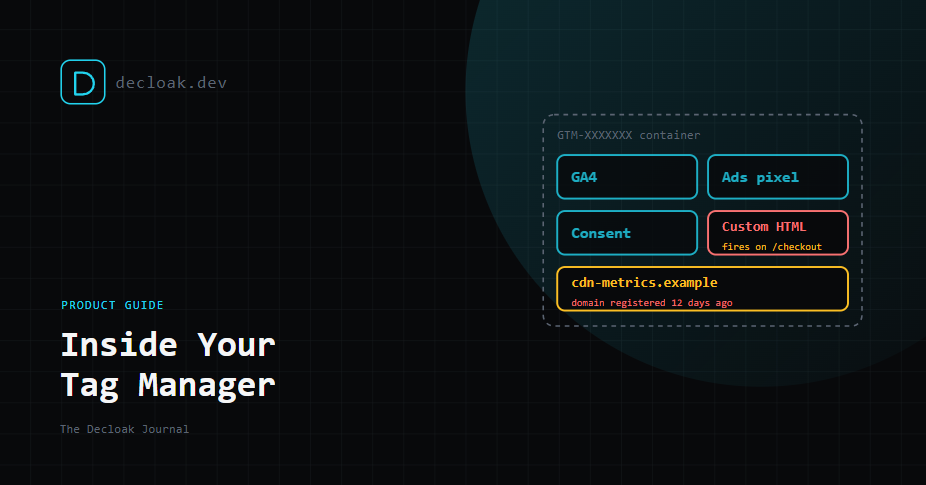
You add one GTM snippet to your site once. After that, the snippet loads a container from Google's servers on every page view. The container holds:
- Tags: the scripts to run. Many are built-in templates for common tools, but a Custom HTML tag can contain any HTML or JavaScript at all.
- Triggers: the rules for when each tag fires, such as all pages, a page matching
/checkout, or a button click. - Variables: values the tags read, such as page URLs, form fields or data layer values. Change the container, click Publish, and every visitor gets the new version on their next page load. No deploy, no review unless you've set one up, and nothing in your server logs.
Why attackers like it
From an attacker's point of view, a tag manager has three useful properties:
- It's trusted. The script loads from a Google domain, so security tools that allow-list well-known domains skip it, and so do people reading the page source.
- It's remote. The malicious code lives in the container, not on your server. The attacker can change it, or swap where stolen data goes, without touching your infrastructure.
- It reaches the payment page. A tag set to fire on the checkout URL can read what shoppers type into the card form. This isn't theoretical. Recorded Future found 569 e-commerce domains infected with skimmers in one study, of which 314 were confirmed to be delivered through GTM. Infections that were cleaned up had lasted 3.5 months on average, and over 165,000 card records linked to GTM-based attacks turned up on carding sites. In some variants the skimmer was placed in a Custom HTML tag, and the legitimate GTM loader injected it into the page.
In 2025, Sucuri investigated a Magento store where a skimmer was disguised as a standard GTM and Google Analytics snippet. It came to light when a customer reported stolen card details.
This style of attack, a malicious script stealing card data from a payment page, is usually called Magecart or e-skimming. It is the reason PCI DSS v4.0 added requirements 6.4.3 and 11.6.1, which we cover below.
What Decloak checks
| Check | What it shows | Plan |
|---|---|---|
| Tag manager intelligence | Every GTM container on the page, its active tags and their firing triggers. Tags sending data to unrecognised or newly registered domains are flagged. | Free |
| GTM container deep-dive | The full parsed configuration: nested tags, the contents of Custom HTML tags, and variable definitions | Starter |
| Domain threat intelligence | Third-party domains checked against malware and phishing data, plus suspicious registration patterns | Starter |
Alongside these, the scan tracks scripts injected into the page at runtime against a list of trusted injectors, and checks whether cross-origin scripts use Subresource Integrity (a hash that stops a changed file from running).
Containers you didn't know about
The first useful result is often just the list of containers. It's common to find a second GTM container left behind by a previous agency, or one added by a plugin. Each one is another set of people who can publish to your site. If a container ID on your site isn't one you recognise, find out who owns it.
Custom HTML tags, read in full
Template tags for well-known tools are fairly predictable. Custom HTML tags are where anything goes. The deep-dive parses the container and shows you what each Custom HTML tag contains, so you can read the code your tag manager is actually serving rather than what someone says it does.
Where the data goes
The check that catches most real problems is where tags send data. A tag sending data to a domain we don't recognise, or one registered recently, is flagged. Skimmers need somewhere to send stolen card numbers, and attackers often register lookalike domains shortly before a campaign. A domain that is three weeks old and receiving form data from your checkout deserves a very close look.
These findings also feed the third-party domain report, so you can see every domain your pages talk to, by category, in one place.
How this maps to PCI DSS v4.0
Two PCI DSS v4.0 requirements are aimed squarely at this problem:
- 6.4.3: every script running on a payment page must be inventoried, authorised and justified as necessary.
- 11.6.1: a change and tamper detection mechanism must alert on unauthorised changes to scripts and HTTP headers on payment pages. Decloak's GTM Custom Tag, Tag Manager, Dynamic Script Injection and third-party domain findings map to these requirements in our compliance view on Pro and above. As with every framework, this mapping is indicative. It helps you build the evidence, but it is not a certified audit and doesn't replace your Qualified Security Assessor. Our PCI DSS post has the detail.
Five things to do this week
- List your containers. Run a scan and check every container ID against the ones you know.
- Review who can publish. In GTM's user management, remove people who have left, and limit Publish permission to the few who need it.
- Turn on extra protection for publishing. GTM offers settings such as requiring two-step verification for sensitive actions. Use them.
- Read every Custom HTML tag. If nobody can explain what one does, pause it.
- Keep tags off the payment page. Most marketing tags don't need to fire on checkout. Use triggers to exclude it, which shrinks what 6.4.3 asks you to justify.
The honest limits
- A scan is a snapshot. We see the container as it was published when we scanned. A malicious version published an hour later won't appear until the next scan. Regular scheduled scans close that gap, but they don't make it zero. We explain how to set them up in Scheduled Scans, Alerts, Slack and Webhooks.
- Triggers can hide behaviour. A tag that only fires for certain visitors, on certain dates, or after particular actions may not fire during our scan. The deep-dive shows its configuration, but we can't promise to observe every runtime path.
- Server-side tagging is invisible. If you use server-side GTM, tags that run on your tagging server never reach the browser, so an outside scan can't see them.
- Obfuscated code needs a human. We show you the code in a Custom HTML tag. Heavily obfuscated code still needs someone to decide whether it's legitimate.
- We can't see your GTM account. Who has access, and whether two-step verification is on, is only visible inside GTM.
- The deep-dive is built for Google Tag Manager. Other tag managers' scripts are still captured by the network, script and third-party domain layers, but not parsed at container level.
Related reading
- The Security Header Almost Nobody Sets: What Content-Security-Policy Actually Does, since a strict CSP limits where scripts can send data
- WordPress Takeovers, Supabase Leaks, and a Skimmer Hiding in Plain Sight Sources: Recorded Future: Threat Actors Continue to Abuse Google Tag Manager for Payment Card e-Skimming, Sucuri: Google Tag Manager Skimmer Steals Credit Card Info From Magento Site
Find out what your tag manager is really publishing. Run a free scan →