Live Security Reports on Your Own Domain: Custom Report Domains for Enterprise
If you run security for clients, a report is part of what you deliver. Since July, White-Label Branding has let you put your own logo, colours and font on PDF reports. But the moment you shared a live report link, your client landed on Decloak's site, with Decloak's branding.
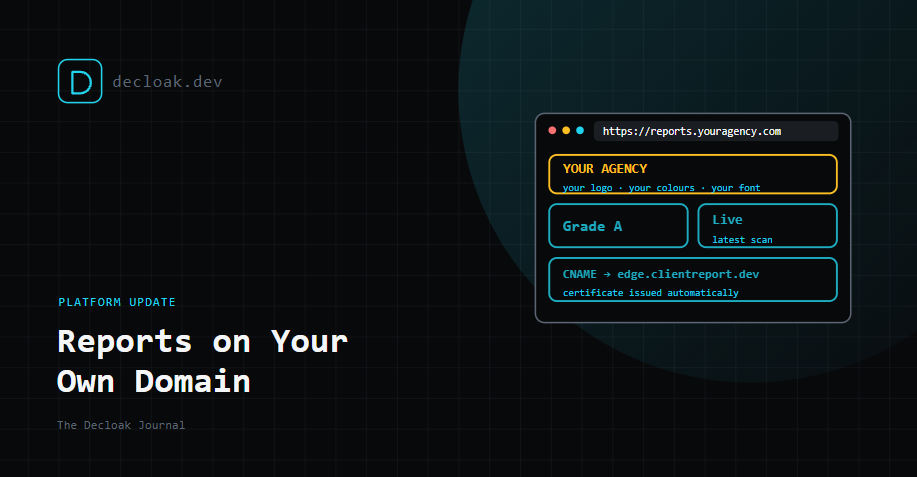
That's now fixed. Enterprise teams can share live security reports on their own subdomain, such as reports.youragency.com, branded entirely as their own. Your client sees your logo, name, colours, font and footer, and nothing from us.
Why a live link beats a PDF
A PDF goes out of date the day you send it. Fix three findings the next week and the PDF still shows them. Your client either works from stale information or waits for the next one.
A live report link stays current. Your client opens the same link and sees the latest scan. You stop emailing attachments, and they stop wondering which version is the latest.
The catch, until now, was where that link pointed. A link to a third-party tool's website invites the question "who are these people?" A link on your own domain, showing your own branding, looks like what it is: your work.
What your client sees
- Your branding, and nothing from Decloak. Your logo and name in the header, your accent colour throughout, your font and your footer. There's no Decloak navigation, pricing, upgrade prompts, chat widget, cookie banner or analytics.
- Only the report. The shared report is the only thing that exists on your domain. Every other address there shows "Not found", so there's no route from your client's report back to us.
- White-labelled PDFs too. If your client downloads a PDF from the report, it carries your branding.
- Private reports. Search engines are told not to index them, and only people with the private link can open one. Once your domain is live, the Share dialog gives you links on your domain automatically. Links you sent before keep working.
How to set it up
It takes one DNS record and a few minutes.
- Save your White-Label Branding. Under Account, then Team, then Branding & reports. You need at least a display name or a logo.
- Enter your subdomain. In the Custom report domain panel, enter a subdomain you own, such as
reports.youragency.com. It must be a subdomain, not your main website. - Add one DNS record. The panel shows how to do this with simple instructions.
- Wait for the certificate. The SSL certificate is issued automatically. It usually goes live within a few minutes, and the panel updates by itself and emails you when it's ready. It works with any DNS provider. The Help guide has steps for Namecheap, Cloudflare, GoDaddy, Route 53 and others.
If something's not right
The panel tells you what's wrong in plain English, rather than a generic error. The usual causes are:
- no record found yet, often because DNS hasn't caught up
- the record points somewhere else
- a proxy setting at your DNS provider getting in the way
- a certificate restriction on your domain, such as a CAA record that only allows certain certificate authorities Fix it, then re-check with one click. If you're not sure what a CAA record is, our DNS records guide explains it.
Security and control
Putting reports on your domain only works if it can't be misused. Here's how it's protected:
- One team per subdomain. A subdomain can only be claimed by one team, so nobody else can take yours.
- Only your reports. Your domain serves your team's reports and nobody else's, even if someone has a valid link to another team's report.
- Owners and admins only. They're the only roles that can set up or remove the domain.
- Nothing breaks if you change plan. If you leave Enterprise, the domain is paused for 30 days and links forward to the standard report page, so nothing you've already sent stops working. After that, the domain is released.
Who it's for
Agencies and consultancies delivering security work to clients. The report becomes part of your service, on your domain, rather than a link to a tool your client has never heard of.
MSPs managing many client sites. Combined with scheduled scans, clients can check one link whenever they like and always see the latest result.
Internal security teams that want reports on a company domain, so colleagues trust the link they're sent.
What it doesn't do
- One subdomain per team. You can't run several report domains from one team.
- No root domains or www. It has to be a dedicated subdomain, such as
reports.orsecurity., not your main website. - It's the report, not the app. Your domain serves shared reports. Your team still signs in to Decloak to run scans and manage findings.
- Private isn't the same as access-controlled. Anyone with the link can open the report, as with any shared link. Treat report links like you would a document link: share them with the people who need them.
Getting it
Custom report domains are included on Enterprise, including lifetime Enterprise deals. White-Label Branding for PDFs stays on Pro and above.
If you're on Enterprise, go to Account, then Team, then Branding & reports, save your branding if you haven't already, and add your subdomain. Most teams are live within a few minutes.
Put your security reports on your own domain. See Decloak Enterprise →